How to Set Up Muse Mail, and the One Setting to Check First
Quick answer
Muse Mail gives your agent its own @muse.ai email address, separate from your personal inbox. Open your Muse's profile, go to the mail tab, pick an address and a sender name, and verify your own email. The setting to check first is your verified addresses, because anyone with access to those inboxes can send your agent instructions.

My Muse has had his own address since November 11. Here’s what setting it up looks like, from my account.
Who can get it
Meta opened Muse Mail on November 10, 2026 to paid subscribers in the US and Canada. Several guides report it reached free accounts in supported countries on November 20. I set mine up on a paid plan, so I can’t confirm the free version first-hand.
What it is, and what it isn’t
Your Muse gets an address ending in @muse.ai. Mail sent from it comes from your agent, not from you.
It does not give Muse access to your Gmail or Outlook. Meta’s help page says the @muse.ai address is separate from your personal account. If you want Muse to read your real inbox, that’s a connector, and a separate decision.
Set it up
- Open your Muse’s profile by tapping its avatar.
- Tap the mail tab, the envelope icon.
- Pick the name before @muse.ai.
- Set a sender name. This is what people see in their inbox.
- Verify your own email address with the code Muse sends.
You can also just ask your Muse to set it up.
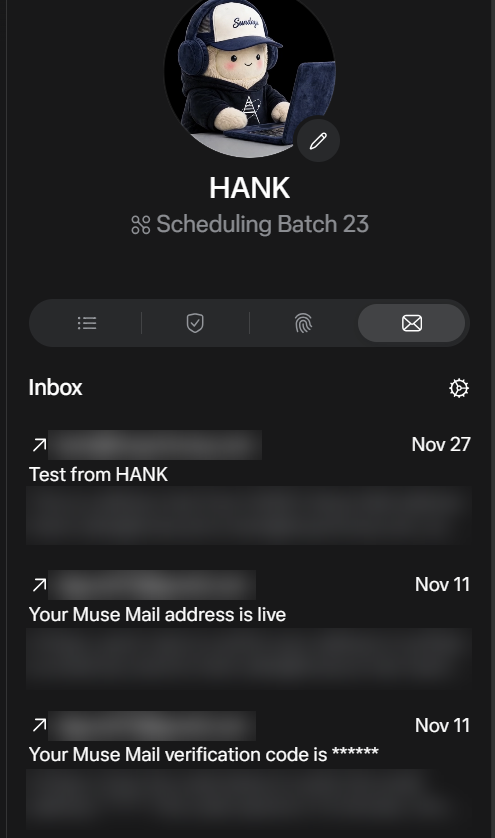
Pick the address carefully. At least one guide reports the part before @muse.ai can’t be changed after you create it. The sender name can be changed later. The screen says so.
The sender name
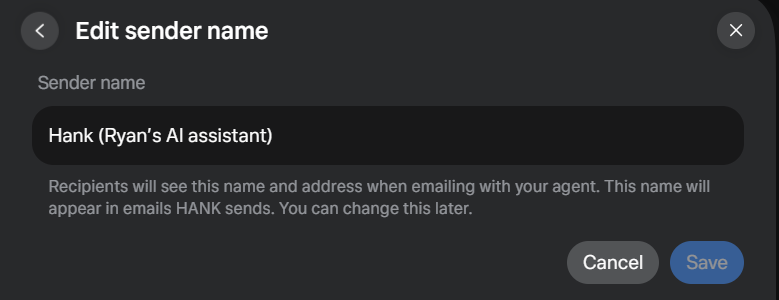
I set mine to “Hank (Ryan’s AI assistant).” Anyone who gets an email from HANK knows two things before opening it: it’s an AI, and it works for me. I’d recommend the same pattern. An agent that sends mail under a name that sounds like a person is going to annoy someone eventually.
The settings that matter
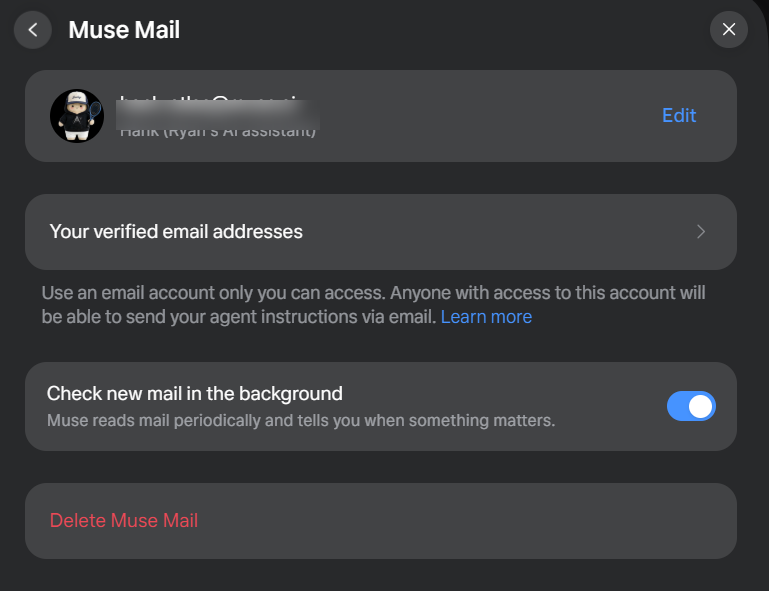
Verified email addresses: check this first
The note under this row is the most important sentence on the screen. Anyone with access to a verified account can send your agent instructions by email.
So a verified address is a remote control for your agent. Only verify inboxes that you alone use. Not a shared work inbox. Not a family account. Not an old address you’ve lost track of.
Check new mail in the background
When this is on, Muse reads incoming mail every so often and tells you when something matters. Mine is on.
The trade-off: HANK reads whatever lands in that inbox, including mail from strangers. Unverified senders can’t give him instructions the way verified addresses can. But an email written to manipulate an agent is still text he reads. That’s why I blurred his address here instead of publishing it.
Delete Muse Mail
Meta’s help page is clear: delete the address and you lose it. Mail sent and received through it is deleted, and new mail to it bounces. The same happens if you reset Muse or delete your account.
What I use it for
HANK’s first real email was a delivery test to a Loop Chomp address on November 27. It arrived.
If you get an email from an @muse.ai address
Meta’s help page says it means someone asked their Muse agent to contact you, or added their Muse to the conversation. A good sender name, like the one above, tells you whose agent it is.
FAQ
Does Muse Mail let Muse read my Gmail?
No. The @muse.ai address is separate from your personal email. Reading your real inbox needs a separate connector that you approve.
Is Muse Mail free?
Meta launched it for paid subscribers in the US and Canada on November 10, 2026. Several guides report it opened to free accounts in supported countries on November 20.
Can I change my Muse Mail address?
The sender name can be changed. At least one guide reports the address itself can’t be changed after creation, so choose carefully.
What happens if I delete Muse Mail?
You lose the address. Sent and received mail is deleted, and new mail to the address becomes undeliverable.
Sources
- Meta help, About Muse email addresses, read November 29, 2026
- Muse on X, launch post, November 10, 2026
- Built With Muse, What Is Muse Mail?, on the November 20 free-plan opening
- note, You can now create a free Muse email address, on the address not being changeable
- My own Muse app, screenshots captured November 29, 2026

Get told when this changes
One email when something real changes: a rollout step, a fix, a price. Written from devices we own.