Every Muse Connector I Can See, Listed by Category
Quick answer
My Muse app lists 60 connectors in four categories as of November 22, 2026. They include Gmail, Google Calendar, Notion, Slack, GitHub, Shopify, Stripe, Spotify and Instagram. You add them under Settings, then Connectors. Connections made in Muse do not carry over to the Meta AI app.

A connector is how Muse reaches one of your apps. Without one, it can only talk about your calendar. With one, it can read it.
Meta doesn’t publish this list anywhere I could find. So I scrolled through mine.
This page counts only Meta’s in-app directory. Other lists also count developer-built and custom connectors, which is why their numbers run higher. The three kinds are explained here.
Where to find connectors
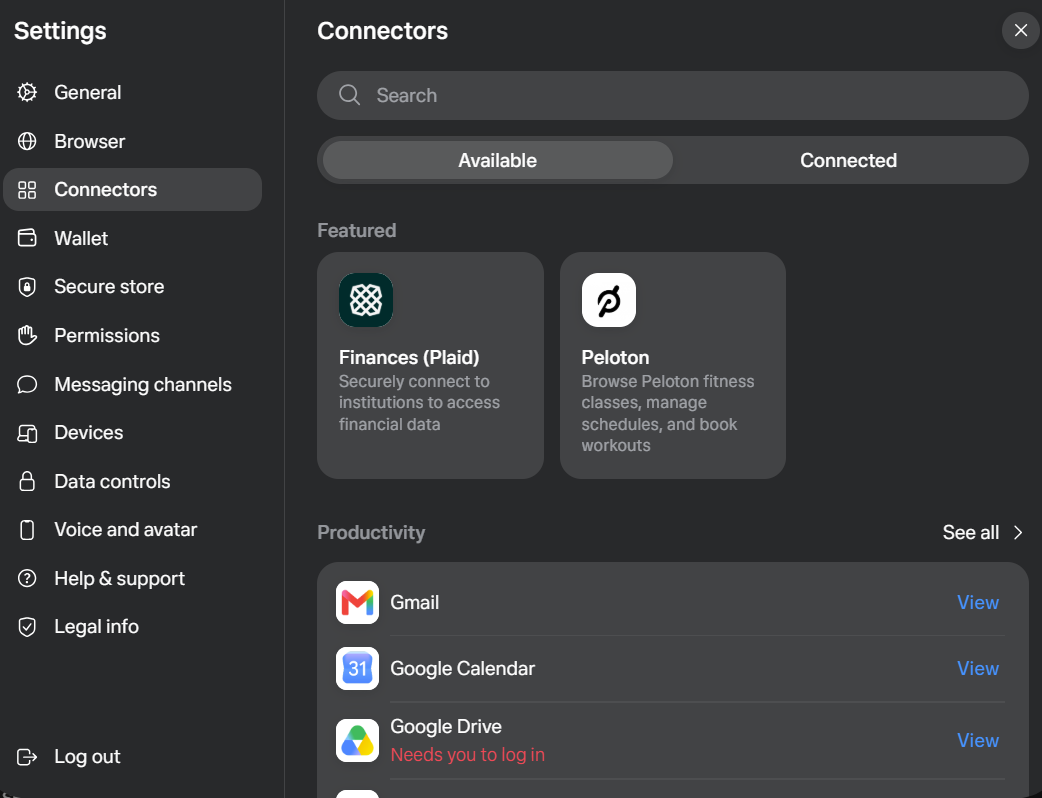
- Open Settings in Muse.
- Choose Connectors.
- Use the Available tab to browse and the Connected tab to see what is linked.
- Tap Connect next to an app and sign in.
Three labels show up next to each app:
- Connect means it is not linked yet.
- View means it is linked.
- Needs you to log in means the link has expired or was never finished. Muse can’t use it until you sign in again.
That third one matters. An agent quietly losing access to your files is how tasks fail without an obvious reason. If Muse stops being able to do something it did last week, check here first.
The full list
This is every connector visible on my account. Yours may differ by region or plan, and Meta adds new ones.
Productivity (27)
- Finances (Plaid)
- Gmail
- Google Calendar
- Google Drive
- Google Docs
- Google Sheets
- Google Slides
- Google Forms
- Google Contacts
- Google Tasks
- Outlook Mail
- Outlook Calendar
- Outlook Contacts
- Notion
- Evernote
- Todoist
- Calendly
- Granola
- Readwise
- 1Password
- Tailscale
- Philips Hue
- Tessie
- Instacart
- Uber (Courier)
- Gumroad
- Runway
Social and entertainment (8)
- Instagram Messages
- Messenger
- Threads
- Threads Messages
- Spotify
- OpenTable
Health and fitness (4)
- Peloton
- Function Health
- HealthEx
- Withings
Business (21)
- Meta Business Manager
- GitHub
- Canva
- Dropbox
- Box
- Zoom
- Slack
- Asana
- Linear
- Figma
- Vercel
- Replit
- Lovable
- Shopify
- Stripe
- QuickBooks
- Printify
- Klaviyo
- Zapier
- HighLevel
- vidIQ
That is 60 in total.
What’s not on the list
At Connect in September, Meta named shopping partners including Walmart, Best Buy, Sephora and Wayfair. None of them appear in my connector directory. They may live somewhere else in the app, or work without a connector. I don’t know which, so I’m not going to guess.
Which ones matter
It depends on the work. For running a business, the ones that change what an agent can do are email, calendar, files and payments. For a developer, GitHub and Vercel.
I’m not going to rank 60 apps I haven’t all used. What I will do is write up the ones I rely on, one at a time, in Living With Muse.
Muse connectors are not Meta AI connectors
If you use Meta glasses, this catches people out. Meta’s help page says connecting an app in the Muse app does not connect it in the Meta AI app, and the reverse. Each asks for its own permission. More on that in Muse vs Meta AI on glasses.
New to Muse? Start with what it is and what it costs.
FAQ
How many connectors does Muse have?
My account shows 60 as of November 22, 2026, across productivity, social and entertainment, health and fitness, and business.
Does Muse connect to Gmail and Google Calendar?
Yes. Both are in the Productivity list, along with Google Drive, Docs, Sheets, Slides, Forms, Contacts and Tasks.
What does “Needs you to log in” mean on a Muse connector?
The connection has expired or was not completed. Muse can’t use that app until you sign in again from Settings, Connectors.
Do my Muse connectors work in the Meta AI app?
No. Meta says connections in one app do not carry over to the other.
Sources
- My own Muse app at muse.ai, Settings, Connectors, recorded November 22, 2026
- Meta Newsroom, The Biggest News From Connect 2026, September 24, 2026
- Meta help, How to use Muse on your AI glasses (Beta), read November 22, 2026

Get told when this changes
One email when something real changes: a rollout step, a fix, a price. Written from devices we own.