How to Record Your Ray-Ban Display Screen
Quick answer
On the glasses, swipe left from the display home, scroll down, select Display recording, then Start recording. Recordings stop at 1 minute and save to your phone's camera roll and to Photos in the Meta AI app. The catch is that every recording combines the display, your point-of-view camera, the microphone and system audio.
Meta calls it display recording. It is the only built-in way to show someone what you see in the lens.
Start a recording from the glasses
- From the display home, swipe left.
- Scroll down and select Display recording.
- When the notification appears, select Start recording.
To stop, go back to the same place and select Display recording again.
Start a recording from your phone
- Open the Meta AI app and tap Glasses in the top right.
- Tap Record display.
- On the glasses, select Start recording on the notification.
To stop, tap Record display in the app again.
The honest catch: it is never just the display
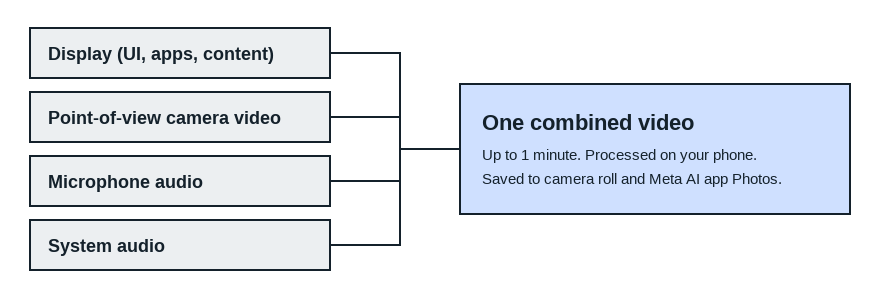
Meta’s help page says a display recording captures four things at once:
- Your glasses display, meaning the UI, apps and content
- Point-of-view camera video
- Microphone audio
- System audio
They are merged into a single video. The page describes no display-only mode. So the room you are standing in, and whatever you say, are part of every recording.
That matters if you want a clean capture of an app or a game. I ran into it building Loop Chomp for the display. Plan the shot like a video, because it is one. Face a plain wall. Stay quiet.
The bystander LED turns on whenever the camera is active during a recording. A recording indicator stays on the display, and tones play at the start and stop.
The 1-minute cap
A recording stops automatically after one minute. You can start another one right away. There is no documented setting to extend it.
Where the video goes
Recordings are processed on your phone, not on the glasses. Then they are saved in two places:
- Your phone’s camera roll
- Photos in the Meta AI app, after import and processing
Meta says recordings are not uploaded to its servers as part of recording, and that it does not use them to develop or improve AI.
Processing is fastest, about a minute, with the Meta AI app open and the phone on Wi-Fi. If your video hasn’t shown up, open the app and wait.
When recording won’t start
Meta lists these conditions:
- Language and region. Display recording is available only in English in the US for now.
- Battery and heat. The glasses need enough charge and must not be overheating.
- Calls. Recording is disabled during voice and video calls, and it ends if a call starts.
- Live AI. Stop Live AI first. Starting Live AI ends a recording.
If the glasses themselves won’t connect, that is a pairing problem. Start with the Neural Band and pairing fix guide. For everything else about the glasses, see the complete guide.
FAQ
Where do Ray-Ban Display screen recordings go?
They are processed on your phone and saved to your phone’s camera roll. They also appear in Photos in the Meta AI app after import.
How long can a display recording be?
Up to one minute. It stops automatically, and you can start a new one immediately.
Can I record only the display, without the camera?
Meta’s help page describes no display-only option. A display recording combines the display, the point-of-view camera, microphone audio and system audio into one video.
Why can’t I start a display recording?
Check that your glasses are set to English in the US, have enough battery, are not overheating, are not on a call, and that Live AI is stopped.
Sources
- Meta help, How to record your display on Meta Ray-Ban Display glasses, read November 22, 2026

Get told when this changes
One email when something real changes: a rollout step, a fix, a price. Written from devices we own.