Muse on Glasses: The Complete Guide
Quick answer
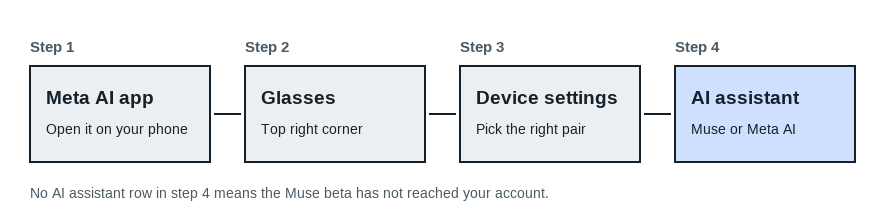
Muse on Meta AI glasses is in beta and reaches accounts in stages. You need the Meta AI app and the Muse app. Switch assistants under Glasses, Device settings, AI assistant. Some music, calling, messaging and navigation features still need Meta AI.
This is the hub. Each section gives the short version and links to the full guide. It is updated whenever one of those guides changes.
Do you have it yet?
Maybe not. The beta is switched on account by account. Check in the Meta AI app under Glasses, Device settings, AI assistant. If Muse is a choice, you are in.
- Full guide: Muse isn’t on your glasses yet? The rollout, explained
- Live status: the Rollout Tracker
What you need
- A pair of Meta AI glasses on an account in the beta
- The Meta AI app, for pairing, settings, firmware, photos and videos
- The Muse app, for your conversations with Muse
Meta has not published a list of supported glasses models or countries. The tracker marks both as unconfirmed.
Switching between Muse and Meta AI
Only one assistant is active at a time. Switch either way from the same screen.
- Full comparison: Muse vs Meta AI on glasses: what changes when you switch
Waking Muse and naming it
Per Meta’s help page:
- “Hey Meta” starts Muse when Muse is the active assistant.
- “Hey Muse” and a custom name work on some glasses models during the beta, not all.
- To set a name, go to Glasses, Device settings, AI assistant, then Manage “Hey [name].”
Meta warns that accidental activations are more likely if the name sounds like a common word. Pick something distinct.
What doesn’t work yet
Some music, calling and messaging, and navigation experiences. Meta’s fix is to switch back to Meta AI for those. The tracker has one row per gap.
Recording what you see
Meta Ray-Ban Display can record its display for up to one minute. The recording always includes the camera view and audio too.
- Full guide: How to record your Ray-Ban Display screen
When pairing breaks
A white blinking LED usually means pairing mode. The fix is almost always the same order: forget the old Bluetooth entry, restart, pair from the Meta AI app.
Privacy basics
- With Muse active, voice recordings and transcripts follow the Muse Privacy Policy.
- Muse can use and store your location if you allowed it in either app. You can ask Muse to delete it and turn it off per app in your phone settings.
- Meta says detected accidental activations are deleted within 90 days of detection.
Cost
Muse is free with a usage limit. Paid plans add usage, and they cost less on the web than in the iOS app. Beta participants get extra usage during the beta. More on plans in What is Muse?
Building for the glasses
Meta lets developers ship web apps to the Display’s 600 by 600 screen. I built one. The first Build Log entry covers what that took: I built a game for a 600x600 display on your face.
FAQ
Which Meta glasses support Muse?
Meta has not published a model list. Its help page only says the custom name and “Hey Muse” are not available on all models during the beta.
Is Muse on glasses available outside the US?
Meta’s help page states no region. We have not confirmed availability in any country outside the US.
How do I switch my glasses back to Meta AI?
In the Meta AI app, tap Glasses, Device settings, AI assistant, then select Meta AI.
Sources
- Meta help, How to use Muse on your AI glasses (Beta), read November 22, 2026
- Meta help, How to record your display on Meta Ray-Ban Display glasses, read November 22, 2026
- Meta help, How to fix pairing issues with AI glasses, read November 22, 2026

Get told when this changes
One email when something real changes: a rollout step, a fix, a price. Written from devices we own.