I Built a Game for a 600x600 Display on Your Face
Quick answer
Meta Ray-Ban Display runs standard web apps on a 600 by 600 additive display. Black pixels are invisible, so a game has to be drawn in bright outlines. Gestures arrive as arrow-key and Enter events. Loop Chomp's glasses mode is live at loopchomp.com/glass.
Loop Chomp is my browser game. Glasses mode lives at loopchomp.com/glass. This is the first entry in a log about building it and getting it listed.
What you are actually building for
Meta opened the Display to developers in two ways. One is the Device Access Toolkit, which extends an iOS or Android app onto the glasses. The other is Web Apps: standalone experiences in HTML, CSS and JavaScript.
I went with a web app. Loop Chomp already runs in a browser, so this was the short road.
The target, per Meta’s developer docs:
- A 600 by 600 display
- An additive display, where dark areas vanish and only bright, high-contrast elements carry the image
- Gesture input delivered as the arrow-key and Enter events a web page already handles
- Hosting over HTTPS at a normal URL
Both paths are preview releases, so any of this can change.
The see-through problem
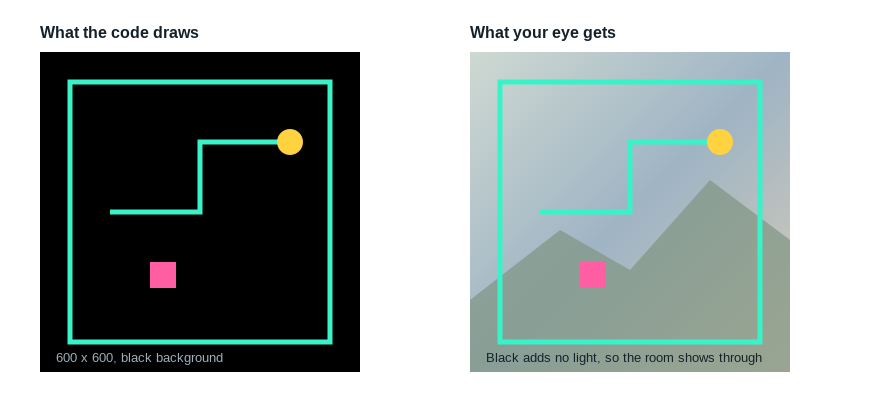
On a phone, a dark background is the stage. On the glasses, it is nothing. The display can only add light, so black pixels show the world behind them.
That flips game art upside down:
- Filled shapes turn into glare. Outlines read better.
- Low-contrast detail disappears against a bright room.
- Anything that needs a dark backdrop to be understood has to be redrawn.
So glasses mode is neon. Bright lines, few fills, nothing that depends on a background being there.
Pinch to turn
In glasses mode you turn with a pinch on the Neural Band. Because Meta maps gestures to arrow-key and Enter events, the input code is ordinary keyboard handling.
The design work is in the game, not the event listener. A pinch is slower and less precise than a thumb on glass. Timing windows that feel fair on a phone can feel unfair on a wrist.
Testing without wearing them
Meta ships a simulator as a Chrome extension. It gives you a 600 by 600 frame with additive blending and lets you put scenes or a live webcam behind your app. It is the fastest way to see what a bright kitchen does to your UI.
It does not replace wearing them. Meta’s own test guidance ends with validation on the physical device.
Recording it is its own problem
I wanted clean footage of the game in the lens. Display recording does not give you that. Every recording merges the display with the camera view and audio, and it caps at one minute. The details are in how to record your Ray-Ban Display screen.
Getting it listed
The game is live at its own URL. Getting it in front of glasses owners inside Meta’s apps is a separate process, and that submission is in flight.
I handed the listing form to my Muse. It fills the form in and stops. It does not submit. I press the button. That split is how I run most things, and it gets its own write-up in Living With Muse.
Next in the log
The submission process, start to finish, once there is an outcome to report. For the wider picture of the glasses, start at the complete guide.
Sources
- Meta for Developers, Build web apps for AI glasses, read November 22, 2026
- Meta Wearables docs, Web Apps: Test, read November 22, 2026
- Meta Wearables docs, Display access overview, read November 22, 2026

Get told when this changes
One email when something real changes: a rollout step, a fix, a price. Written from devices we own.