I Built a Lead Tracker Inside Muse. It Reads Two Inboxes and Never Replies.
Quick answer
My Muse checks two Gmail inboxes every 30 minutes for website form notifications, logs each lead to a file, alerts me in chat and rebuilds a dashboard Space. Its Gmail access is read-only and it never replies to a lead. As of November 29, 2026 the log holds 316 submissions from 21 client sites, and 262 counted leads once duplicates and spam come out.
My marketing company builds websites for local service businesses. Every one of those sites has a quote form, and every form sends an email. For a long time those emails just piled up in two inboxes.
Now my Muse, HANK, counts them.
What it does
- Checks two Gmail inboxes every 30 minutes through the Gmail connector: my business inbox and my personal one.
- Spots a lead by who sent it, not by the subject line.
- Adds the lead to a log, one row per submission.
- Alerts me in chat right away.
- Rebuilds a dashboard Space from the updated log.
Then I text the client myself. Every follow-up with leads and clients is mine.
How it spots a lead
The client sites are hosted on Netlify. Every form submission sends a notification from the same address, formresponses@netlify.com. The subjects are all over the place, because each site sets its own. Some say “New Form Completed!” Others name the service and the business.
So HANK matches on the sender and ignores the subject. That wasn’t the first version. More on that below.
There’s also a second stream. My company’s own site builder sends notifications about prospects for us, not for a client. Those go to a separate log, so they never get mixed into client numbers.
What the log keeps, and what the dashboard shows
The log is a CSV file with one row per form submission:
- date and time
- the client site and business name
- the lead’s name, phone and email
- the service they asked for, their town and a short note
- which inbox it arrived in, and the Gmail message ID
- two flags: duplicate notification, and likely spam
The dashboard is the view I actually look at. It shows:
- each client site, ranked by lead count
- weekly and monthly trends
- which services people ask for
- filters by client and by date
- a claim builder that turns the numbers into sentences I can quote in a case study
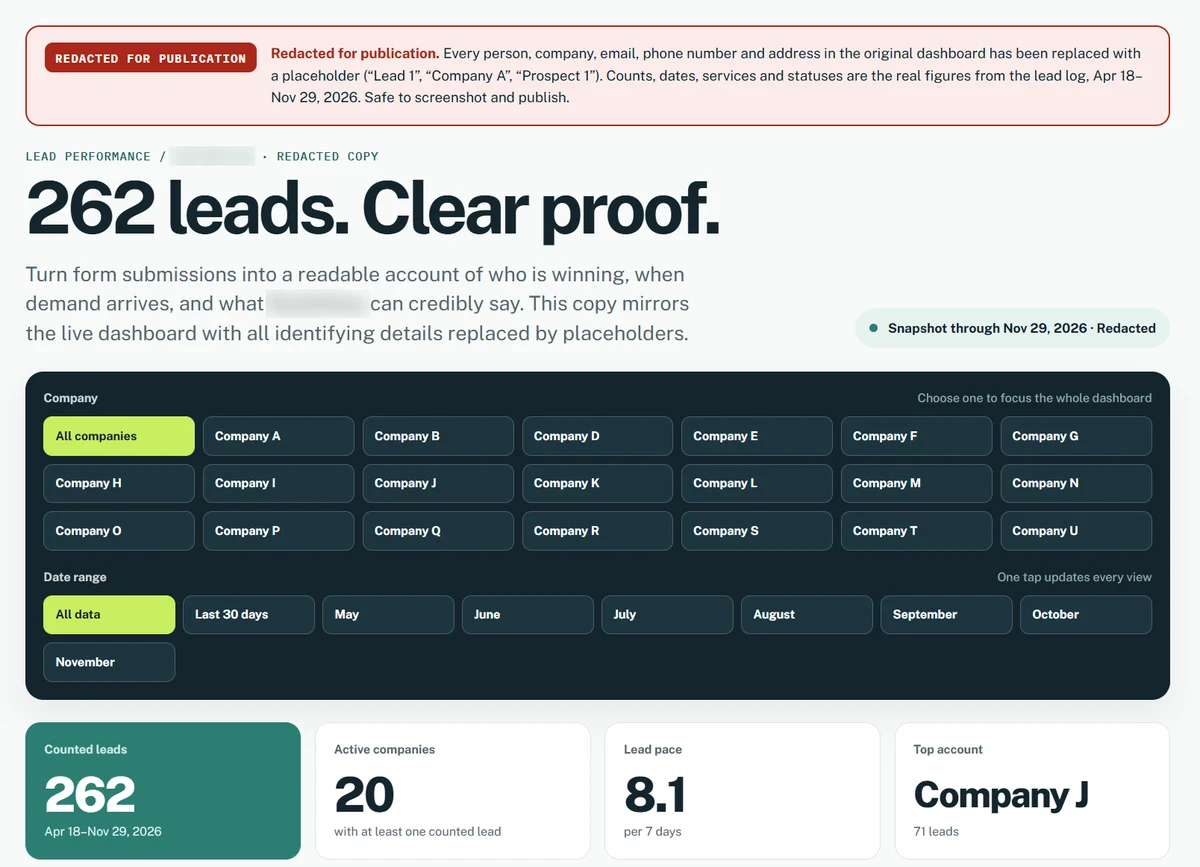
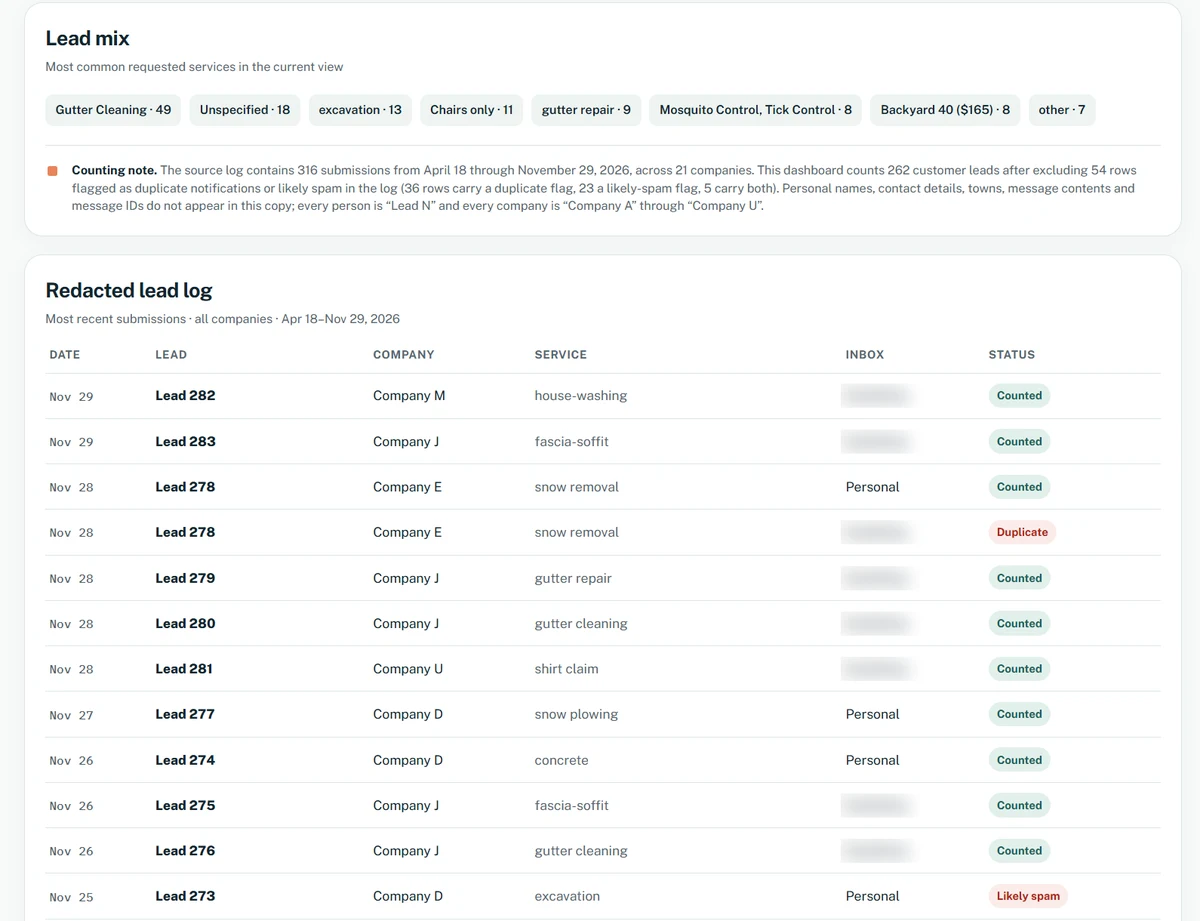
For this post, HANK built a redacted copy of the dashboard. Every person and company is a placeholder, like “Lead 1” and “Company A”. The counts, dates, services and statuses are the real figures from the log.
The numbers, as of November 29
| What | Count |
|---|---|
| Submissions logged | 316 |
| Flagged as duplicate notifications | 36 |
| Flagged as likely spam | 23 |
| Carrying both flags | 5 |
| Counted leads, after removing flagged rows | 262 |
| Client sites | 21 |
| Client sites with at least one counted lead | 20 |
| Company prospects, in their own log | 7 |
| Date range | April 18 to November 29, 2026 |
The watch started on September 9, the day after Muse launched in the US. The rows from April 18 to early September came from HANK searching the inboxes’ history when he set it up.
That’s also why HANK calls the dashboard a floor, not the whole history. It only holds notifications that were delivered to those inboxes and were still sitting there when he looked.
What runs on its own, and what doesn’t
Automatic: reading the inboxes, logging, flagging duplicates and spam, alerting me, and rebuilding the dashboard.
Never: replying to a lead, or marking, archiving or deleting an email. The Gmail access is read-only.
The one status HANK sets himself is “contacted” on the prospect log, and only after I’ve actually followed up.
That split is why I trust it. The work that touches customers is mine. The counting is his.
What broke
- Missed leads, fixed September 12. The first version matched one exact subject line. Sites with different subjects slipped through. Matching on the sender address fixed it.
- A prospect almost counted as a client lead. The site builder’s notifications mention a client’s site in the preview, and at least one nearly got logged as that client’s lead. All of those now go straight to the prospect log.
- Double counting. One submission often lands in both inboxes. Both rows stay in the log for the record, the second gets flagged, and published totals leave it out.
- Spam. Bots, gibberish, and the odd supplier sales pitch sent through a quote form. Flagged or left out of counts, never deleted, so the record stays complete.
- A three-hour gap, November 28. Gmail rate limiting stalled the watch one morning. HANK checked afterward and no late leads turned up from the gap. He still won’t certify counts for that window.
Build your own
HANK doesn’t have the original prompt on record, so this is a cleaned-up starting point, not a quote:
Three things worth settling before the first count:
- One sender address. Find the address every lead notification comes from. If your forms send from several, list them all.
- What counts as a duplicate. Decide before the first total, not after you’ve quoted one.
- Where contact details live. Keep them in the log and off the dashboard, especially if you’ll ever share the dashboard.
FAQ
Can Muse work as a CRM?
For tracking, mine does. It logs, counts, flags and alerts. It doesn’t follow up with anyone, and I don’t want it to.
Does Muse reply to leads?
Mine doesn’t. Its Gmail access is read-only, and replying to leads is my job.
Does this only work with Netlify forms?
The method only needs one consistent sender address for your form notifications. I’ve only run it on Netlify forms.

Get told when this changes
One email when something real changes: a rollout step, a fix, a price. Written from devices we own.